Is your online location showing hundreds of miles away from your actual home? Discover the technical mechanisms behind inaccurate IP geolocation, why GeoIP databases desync, and how to fix wrong IP locations on your home network in 2026.
Why Does My IP Address Show the Wrong Location? Causes & Technical Fixes (2026)
Author: TraceMyIPOnline Network Security Team Last Updated: August 2026 Reviewer: Senior Network Infrastructure Engineer & IP Geolocation Specialist Geo-Targeting Focus: Covers ISP routing structures across the United States (Comcast, AT&T, Verizon), United Kingdom (BT, Virgin Media), Germany (Deutsche Telekom), and Canada.
Have you ever checked a weather app, loaded a map, or run an IP lookup only to find your internet connection placed in a completely different city or even another state?
Author: TraceMyIPOnline Network Security Team Last Updated: August 2026 Reviewer: Senior Network Infrastructure Engineer & IP Geolocation Specialist Geo-Targeting Focus: Covers ISP routing structures across the United States (Comcast, AT&T, Verizon), United Kingdom (BT, Virgin Media), Germany (Deutsche Telekom), and Canada.
Have you ever checked a weather app, loaded a map, or run an IP lookup only to find your internet connection placed in a completely different city or even another state?
This is one of the most common tech confusions for internet users worldwide. A user sitting in Manchester might find their IP routed through London, or a resident in Austin, Texas might be tagged as connecting from Dallas or Chicago.
In 2026, where streaming licenses, local banking security, and online privacy rely heavily on geolocation, having an inaccurate IP can cause frustrating website blocks and localized errors. This comprehensive technical guide breaks down why IP addresses show the wrong location, how geolocation databases work, and the exact steps to fix it.
1. The Core Misconception: IP Geolocation vs. GPS
To understand why your location is inaccurate, you must first understand the fundamental difference between GPS and IP Geolocation:
- GPS (Global Positioning System): Uses hardware receivers in your smartphone or laptop communicating directly with orbiting satellites. GPS calculates your physical position down to a few meters.
- IP Geolocation: Does not use satellite triangulation. An IP address is simply a logical routing label assigned by your Internet Service Provider (ISP). Geolocation services look at public routing tables and database registries to estimate where that block of IP addresses is deployed.
An IP address was designed to route data packets across networks, not to serve as a physical tracking beacon.
2. The 5 Real Reasons Your IP Shows the Wrong City
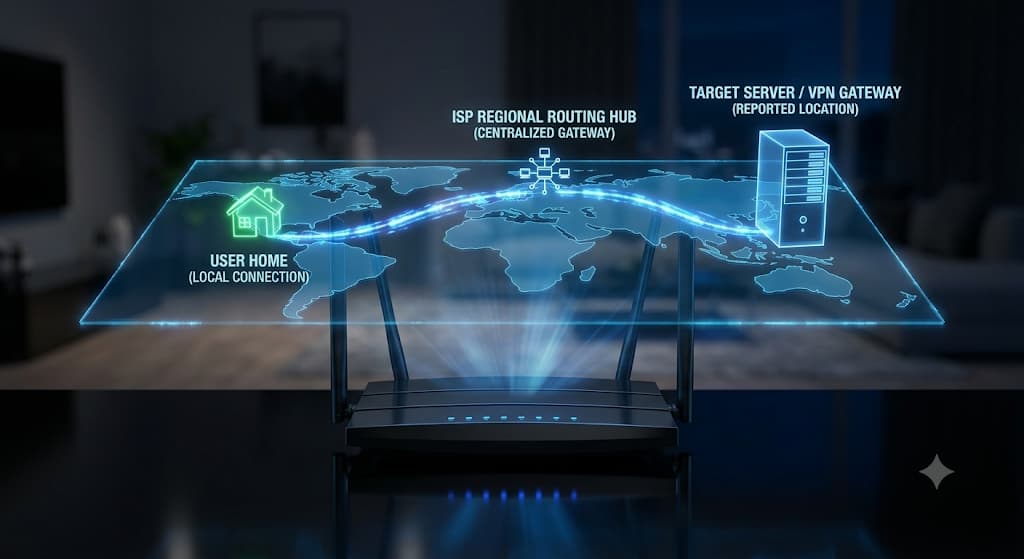
1. ISP Regional Hubs & Centralized Gateway Routing Internet Service Providers (like Comcast, Spectrum, BT, or Vodafone) do not deploy a unique data center in every small town. Instead, they aggregate traffic from hundreds of neighborhoods into massive regional routing centers (PoPs - Points of Presence). If your local town's traffic is bundled and routed through a hub located 150 miles away in a major metropolitan city, public IP lookup tools will identify your location as that metropolitan hub.
2. CGNAT (Carrier-Grade Network Address Translation) With the global exhaustion of IPv4 addresses, ISPs increasingly implement CGNAT. Under CGNAT, hundreds of households share a single public IP address assigned at the ISP's core infrastructure. Because that public IP belongs to the central gateway, every user connected to that node inherits the gateway's geographic coordinates rather than their local town.
3. Desynchronized GeoIP Databases Websites do not maintain their own maps of the internet. They subscribe to commercial GeoIP database providers such as MaxMind (GeoIP2), IPinfo, DB-IP, and IP2Location. When an ISP buys, sells, or reassigns a block of IP addresses from one region to another, it can take weeks or months for third-party databases to update their records. If a streaming site uses an outdated database cache, you will be flagged in the wrong location.
4. Active VPNs, Proxies, and Private Relays You might have a background privacy service active without realizing it:
- Apple iCloud Private Relay: Automatically encrypts Safari traffic and routes it through dual relays, often altering your city-level IP to a generalized regional area.
- Browser-Level VPNs: Features built into browsers like Opera or privacy extensions can reroute your browser traffic while leaving your system IP untouched.
5. Dynamic IP Pool Cycling Most home broadband contracts provide Dynamic IPs. When your router restarts, your ISP leases you a new address from their available pool. If that particular IP was assigned to a customer in another district yesterday, old location cookies and cached database entries may take time to refresh.
3. Step-by-Step Guide: How to Fix or Update Your IP Location
Step 1: Verify the Inaccuracy Across Multiple Sources Before attempting fixes, run an audit. Visit dedicated lookup tools like TraceMyIPOnline to view your current public IP, hostname, and ISP. Compare the result with major commercial databases:
- Check if the discrepancy is city-level (normal routing hub behavior) or country-level (indicates an active proxy/VPN or severely corrupted database record).
Step 2: Force a New Dynamic IP Lease (Power-Cycling) If your ISP uses dynamic pools, you can often release your current IP:
- Turn off your Wi-Fi router.
- Unplug the power cable and leave it completely disconnected for 15 to 20 minutes (this allows the ISP's DHCP lease table to expire).
- Plug the router back in. In many cases, your router will be assigned a fresh IP address that may route closer to your regional node.
Step 3: Submit a Correction to GeoIP Providers If you have a static IP or a permanent assignment that consistently displays the wrong city, you can submit a direct correction request to the major database maintainers:
- MaxMind GeoIP Correction: Submit an IP correction ticket directly on the MaxMind GeoIP Data Correction portal specifying your correct Country, State, City, and Postal Code.
- IP2Location & DB-IP Correction: Both services provide public web forms to report incorrect location mapping. Once approved, the update propagates to client websites during their next database refresh cycle.
Step 4: Check Browser Geolocation Permissions & HTML5 Location If a local service (like Google Maps or a food delivery app) shows the wrong city on your desktop browser:
- Open browser settings and go to Privacy & Security > Site Settings > Location.
- Ensure the site is allowed to access your browser's native location API (which uses nearby Wi-Fi network BSSIDs to calculate precise physical location instead of relying solely on IP lookup).
4. Frequently Asked Questions (FAQ)
Q: Does an incorrect IP location mean my network has been hacked? A: No. A misplaced IP address is almost always the result of ISP gateway routing, dynamic address reallocation, or outdated GeoIP database records. It does not indicate unauthorized access or a security breach.
Q: Why does my smartphone show my real city on mobile data, but a different city on home Wi-Fi? A: Smartphones utilize GPS hardware and cell tower triangulation alongside cellular network data to establish high-precision location. Your home Wi-Fi relies on fixed broadband IP routing, which reports the location of your ISP's nearest centralized data hub.
Q: Can I get my ISP to assign an IP for my exact town? A: Generally, residential ISPs cannot manually map a dynamic IP to a specific neighborhood. However, upgrading to a business-tier static IP allows you to register permanent geographic metadata with registry providers like ARIN or RIPE.
Conclusion
An IP address is an instrument of network routing, not physical navigation. Minor geographic discrepancies are a natural byproduct of how modern internet infrastructure, centralized routing hubs, and dynamic IP pools operate. By understanding GeoIP database propagation, clearing local network caches, and submitting corrections to primary data providers, you can resolve location mismatches and keep your online services functioning seamlessly.