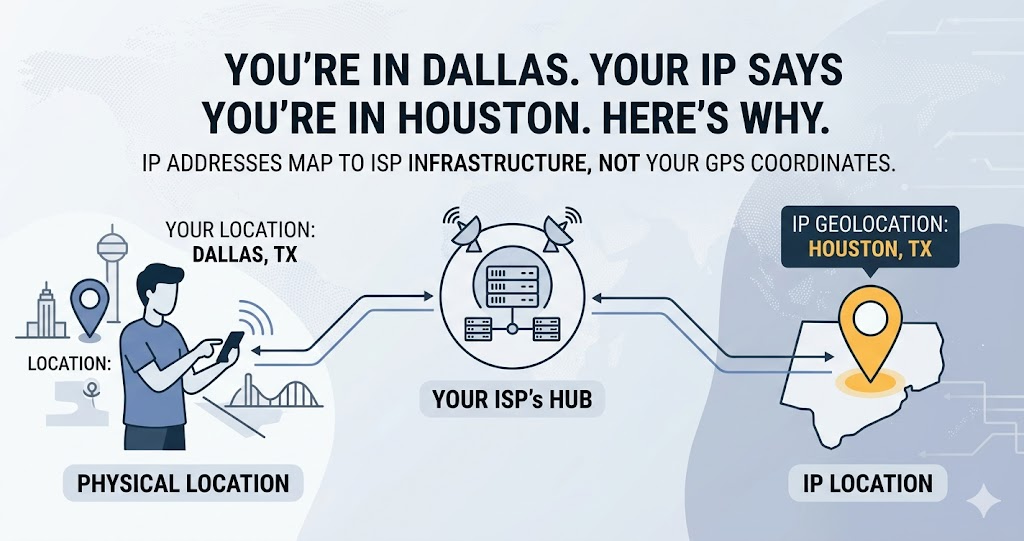
You are in Dallas. Your IP says you are in Houston. You are in Croydon and your IP shows Reading. You are in Ontario and it says Toronto. None of these are errors. They are artifacts of how internet infrastructure works — and understanding why reveals something genuinely interesting about how the internet is organized.
You're in Dallas. Your IP Says You're in Houston. Here's Why That Happens.
IP geolocation mismatch is one of the most commonly reported "my internet is broken" complaints that turns out not to be a technical problem at all. Your IP address resolves to a city you are not in. You are in Edinburgh and your IP shows Glasgow. You are in Ontario and your IP says Toronto. You are in suburban Sydney and your IP shows the Sydney CBD.
None of these are errors, exactly. They are artifacts of how internet infrastructure works — and understanding why reveals something genuinely interesting about how the internet is organized.
Check exactly what city and ISP your IP currently shows at tracemyiponline.com/ip-lookup — free, no signup.
"IP geolocation is fundamentally a mapping of network infrastructure to geography, not a direct observation of where devices are. The databases are updated continuously, but they lag behind ISP infrastructure changes, and they reflect where IP blocks are registered rather than where they are physically used. For a residential user 50 miles from their ISP's hub city, showing the hub city's location is expected behavior — not a failure of the geolocation system."
— Dr. Hiroshi Tanaka, Network Geolocation Researcher, MIT Network Research Group
The Core Reason: IP Addresses Are Assigned to ISPs, Not to Users
This is the key insight. IP addresses are not GPS coordinates. They are administrative assignments.
When your ISP — Comcast, BT, Rogers, Telstra — receives a block of IP addresses from a Regional Internet Registry, those addresses are registered to a specific location: typically the ISP's headquarters, a regional hub, or a data center. The ISP then distributes these addresses to customers across a wide geographic area.
If Comcast's Midwest regional hub is in Chicago and they have assigned a block of IPs registered to that Chicago address, customers in Indianapolis, Milwaukee, Kansas City, and St. Louis might all end up with IPs that geolocate to Chicago — because the IP block is registered there, not because the customers are there.
The geolocation database that sites query does not have live access to your actual location. It has a static mapping of IP ranges to locations, updated periodically. When the database says your IP is in Chicago, it means the IP block containing your address is registered to an entity in Chicago. That is all it says.
Six Specific Reasons Your IP Shows the Wrong Location
1. ISP hub routing: The most common cause. Your ISP routes your traffic through a central hub in a major city, and the IP block is registered to that hub's location. If you live 100 miles from the hub, your IP resolves to the hub city.
2. CG-NAT (Carrier Grade Network Address Translation): Increasingly common as IPv4 addresses run short. Your ISP uses CG-NAT to share one public IP address among many customers across a wide geographic area. The single shared IP is registered wherever the CG-NAT device sits — often an ISP facility in a large city, regardless of where any individual customer is.
3. Mobile carrier routing: Mobile data is particularly prone to location discrepancy. Carriers route mobile traffic through central switching facilities. A user in rural Queensland on Telstra might appear to be in Sydney because Telstra's mobile gateway is there. This is normal and expected for mobile connections.
4. Geolocation database lag: ISPs periodically reassign IP blocks to different regions as they expand or restructure. The geolocation databases that websites query are not updated in real time — they are updated periodically, and there can be weeks or months of lag between an ISP reassigning an IP block and the geolocation databases reflecting the change.
5. IPv6 vs IPv4 discrepancy: If your connection uses IPv6 (increasingly common), the IPv6 geolocation databases may have different or less precise data than IPv4 databases, potentially showing a different location than your IPv4 address would.
6. VPN or proxy: If you are using a VPN, your IP is the VPN server's IP — which is located wherever the VPN server is, not where you are. If your VPN is set to a US server, your IP will geolocate to the US. Verify VPN status at tracemyiponline.com/vpn-detector.
Before vs After: Testing IP Location Across Different Connections
Home broadband (BT Infinity, London user in Croydon): IP Lookup result: Location shows Reading, Berkshire. ISP: British Telecommunications. This is not an error — BT's regional infrastructure routes South London traffic through a hub in Reading. The user is 40 miles from the displayed location. This is typical for large ISP routing infrastructure.
Same user on mobile data (EE network): IP Lookup result: Location shows Birmingham. ISP: EE Limited. Mobile carrier routing through EE's national switching center. The user is 120 miles from the displayed location. Again, not an error — mobile routing discrepancies are larger than broadband discrepancies.
Same user connected to VPN (US server selected): IP Lookup result: Location shows Chicago, Illinois. ISP: VPN Provider. The IP is the VPN server's IP, geolocated to Chicago. No trace of the user's actual UK location. VPN working correctly — verified at tracemyiponline.com/vpn-detector.
Why This Matters — Real Consequences of IP Location Discrepancy
For most users, IP location discrepancy is a trivia matter with no practical consequences. For some use cases, it matters significantly.
Content geo-restriction: Streaming services use IP geolocation to enforce regional licensing. If your IP geolocates to a different country than you are in, you might incorrectly see content from another region, or be blocked from content you should have access to. This is rare but documented.
Price localization: E-commerce and travel booking sites use IP location for price localization. A user whose IP geolocates to a different region might see prices for that region rather than their own. Usually the difference is minor, but occasionally meaningful.
Legal compliance systems: Sites with region-specific legal requirements — gambling, cannabis, financial services — use IP geolocation for access control. A user whose IP geolocates to a jurisdiction where a service is legal might gain access they technically should not have, or be blocked from a service they should be able to use.
Fraud detection: Banks and payment processors flag logins from unexpected locations. If your IP consistently geolocates to a different city, this can occasionally trigger fraud alerts. Having documentation of the normal geolocation discrepancy can help when contacting your bank about a flagged transaction.
VPN detection: Streaming services detect VPNs by checking whether your IP is a datacenter IP rather than a residential IP. The city shown in geolocation is less important than the connection type classification. Check yours at tracemyiponline.com/vpn-detector.
For California and New York Users: Why Location Accuracy Varies by Region
IP geolocation in California and New York is generally more accurate than the national average — both states have dense urban infrastructure where ISP hubs are closer to customers. Los Angeles, San Francisco, and New York City users typically see city-level accuracy because the concentration of internet infrastructure means IP blocks are registered to more granular locations.
However, California's large rural areas — Central Valley, Sierra Nevada, North Coast — experience the same hub-routing discrepancy that rural users see everywhere. A user in Fresno might geolocate to Los Angeles. A user in Stockton might show San Francisco. This is ISP routing, not a data error. Check your current location display at tracemyiponline.com/ip-lookup.
For London and UK Users: BT, Virgin, and Sky Routing Quirks
UK internet users frequently notice IP location discrepancies due to how the major ISPs have structured their network infrastructure. BT routes significant traffic through hubs in Reading and Birmingham. Virgin Media uses a more distributed infrastructure but still causes location discrepancies for users in smaller cities. Sky Broadband similarly routes through centralized facilities.
For London users specifically: south London connections often route through Reading or Guildford hubs, showing those as the IP location. East London connections may show Essex locations. This is normal BT infrastructure behavior. Check your current display at tracemyiponline.com/ip-lookup and verify your DNS performance at our DNS Lookup.
For Toronto and Ontario Users: Rogers and Bell Routing Patterns
Ontario internet users with Rogers, Bell, or Videotron connections frequently see IP locations in Toronto or Ottawa regardless of their actual location within the province. Both ISPs route significant traffic through their major hub facilities in these cities before routing to destinations.
For Rogers customers in Hamilton, Kitchener-Waterloo, or London, Ontario: a Toronto IP location is expected and normal. For Bell customers in Gatineau or eastern Ontario: Ottawa is the common hub. This is not a service issue. Check your connection's geolocation display at tracemyiponline.com/ip-lookup alongside a VPN check at tracemyiponline.com/vpn-detector.
For Sydney and Australian Users: Telstra and NBN Routing
Australian internet geography amplifies the hub-routing discrepancy. With major population centers concentrated in Sydney, Melbourne, Brisbane, and Perth — and vast distances between them — ISP routing through capital city hubs is even more pronounced than in European or US markets.
Regional NBN users in New South Wales might geolocate to Sydney regardless of whether they are in Bathurst, Wollongong, or Newcastle. Telstra and Optus rural customers across Queensland frequently show Brisbane. This is the expected behavior given Australia's internet infrastructure topology. Check your current IP location at tracemyiponline.com/ip-lookup.
Can You Fix IP Location Discrepancy?
For most purposes, there is nothing to fix — the discrepancy is normal infrastructure behavior, not an error. But if the location shown is causing practical problems, here are the options:
Use a VPN with a server in your actual city: Major VPN providers offer servers in specific cities. Connecting to a VPN server in your actual city will cause your IP to geolocate there — often more accurately than your ISP's routing. Verify the VPN result at tracemyiponline.com/vpn-detector.
Report inaccuracy to geolocation providers: Major geolocation database providers — MaxMind, ipinfo.io, DB-IP — have processes for ISPs to submit location corrections. If you work for an ISP or have influence over network administration, this is the legitimate path to fixing inaccurate geolocation at scale.
Accept it: For the vast majority of use cases, the discrepancy between your actual location and your IP's geolocated location has no practical consequence. It is interesting, not problematic.
Frequently Asked Questions
Is my IP showing the wrong location a security problem?
No. IP location discrepancy is normal infrastructure behavior, not a sign of compromise. If you are concerned about your network security, check your open ports at our Port Checker and your IP reputation at our Blacklist Checker — these are more meaningful security indicators.
Why does my mobile IP show a completely different city than my home IP?
Mobile networks route through different infrastructure than home broadband. Mobile carrier central gateways are often in different cities than broadband hubs. Switching between home WiFi and mobile data changes your public IP, your apparent ISP, and your geolocated city — all normal behavior.
Can I make my IP show my actual location?
Not directly — you cannot control what your ISP's IP block is registered as. Using a VPN server in your actual city is the closest workaround. Some VPN providers specifically offer "residential IP" options that geolocate more accurately to user locations.
My IP location changes every few days — is this normal?
Yes, for dynamic IP users. ISPs periodically reassign dynamic IP addresses, giving you a different IP from their pool. The new IP may be from a different block registered to a different location. This is entirely normal dynamic IP behavior.
Will the location shown to websites affect what prices I see?
Potentially, for price-localized sites. Travel booking sites, software subscription platforms, and some e-commerce sites use IP location for regional pricing. The effect varies by site and product category. It is generally not significant for most purchases.
Does my location discrepancy affect streaming service availability?
Usually no — streaming services check your IP against their own geolocation systems, and most are robust enough to classify you correctly even with ISP routing discrepancies. The more common issue is VPN detection rather than routing discrepancy.
How accurate is IP geolocation supposed to be?
Industry benchmarks: country level, 99%+. State/region level, 90%+. City level, approximately 80% in dense urban areas and 50-60% in rural areas. Postal code level, around 60-70% in optimal conditions. Street address: not possible from IP data.
The Honest Summary
IP geolocation is a useful approximation, not a precision instrument. It tells websites roughly where you are based on where your ISP's infrastructure is registered. That is good enough for most purposes — content localization, language settings, time zone detection — but imprecise enough that relying on it for anything requiring exact location would be a mistake.
The discrepancy between your actual location and your displayed IP location is almost always an infrastructure artifact, not an error and not a security problem. It is how the internet's address system works when mapped to geography.
Check your current IP location and all associated data at tracemyiponline.com/ip-lookup. Verify any VPN you use at our VPN Detector. Check your DNS configuration at our DNS Lookup. All free at TraceMyIPOnline.com.