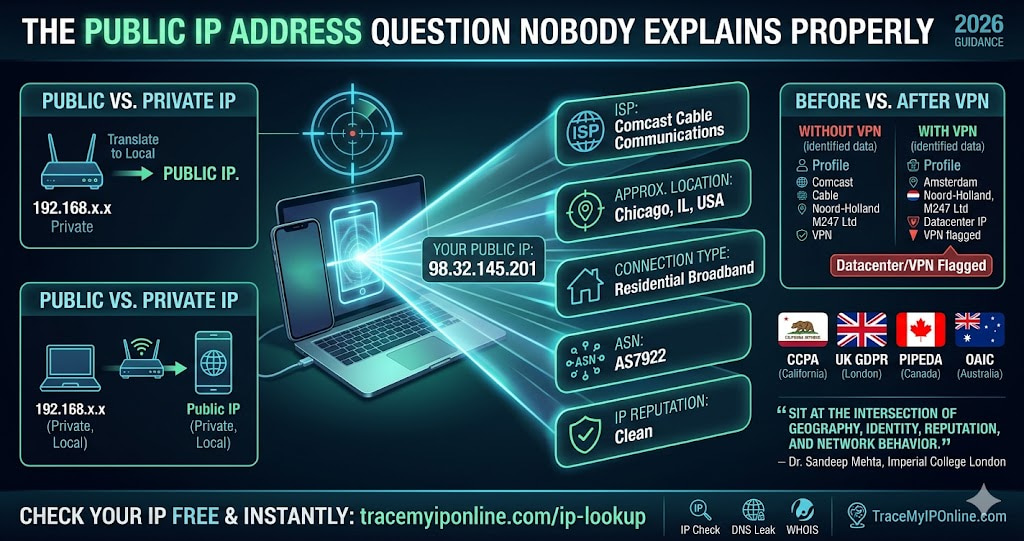
You have a public IP address right now. It is attached to everything you do online. You probably do not know what it is, and you almost certainly do not know what information is attached to it by the time it reaches any website you visit. This guide explains the difference, what is revealed, and how to check — in plain terms, no jargon.
The IP Address Question Nobody Explains Properly
You have a public IP address right now. It is attached to everything you do online. You probably do not know what it is, and you almost certainly do not know what information is attached to it by the time it reaches any website you visit.
Most "what is my IP" guides stop at giving you the number. That is the least interesting part. The interesting part is what that number reveals, how it changes, how it can be changed intentionally, and why knowing it matters more in 2026 than it did five years ago.
Check your current public IP address and everything attached to it at tracemyiponline.com/ip-lookup — free, no signup.
"Most users think of their IP address as just a number. It is actually a data point that sits at the intersection of geography, identity, reputation, and network behavior. When I assess a client's digital privacy posture, the IP address and what is attached to it is always where we start. The number is trivial — what it tells us is not."
— Dr. Sandeep Mehta, Network Security Researcher, Imperial College London
Public IP vs Private IP — The Distinction That Actually Matters
Your device has two IP addresses operating simultaneously and serving completely different purposes.
Your private IP address is assigned by your router and is only visible within your local network. It is typically something like 192.168.1.45 or 10.0.0.12. Every device on your home network has a different private IP. When your laptop and your phone both connect to your home WiFi, the router assigns them different private IPs so it can keep their traffic separate. The internet never sees these addresses.
Your public IP address is what the internet actually sees. It is assigned by your ISP and is shared by every device on your network through a process called NAT (Network Address Translation). When your phone and laptop both browse the web, they appear to the outside world as coming from the same single public IP — your router handles the translation between public and private.
When anyone talks about "your IP address" in the context of privacy, tracking, or geolocation — they mean your public IP. Check yours right now at tracemyiponline.com/ip-lookup.
What Is Actually Attached to Your Public IP Right Now
An IP address by itself is just a number. But IP addresses are registered and cross-referenced against multiple databases that attach real information to them. When a website receives a request from your IP, it can query these databases and learn:
Your ISP: The company providing your internet — Comcast, BT, Rogers, Telstra, AT&T, whoever. This is visible to every site you visit, and ISPs are businesses with data monetization interests of their own.
Your approximate location: Country with near-perfect accuracy, state or region with high accuracy, city with reasonable accuracy in urban areas. Not your street address — but close enough for location-targeted advertising and content restriction.
Your connection type: Whether you are on residential broadband, a business connection, mobile data, or a datacenter IP (which suggests a VPN or server). Streaming platforms use this specifically to detect VPNs.
Your ASN (Autonomous System Number): The registered network block your IP belongs to. This reveals your ISP's infrastructure details and is used by fraud detection systems to assess risk.
Your IP's reputation: Whether the IP appears on spam blacklists, has been associated with malware distribution, or has other negative history. If you are on shared hosting, your neighbors' behavior affects this.
How Your Public IP Changes — and When It Doesn't
Most home internet connections use dynamic IP addresses — the ISP assigns a new IP periodically, or when you restart your router. The timing varies by ISP. Some reassign IPs every few days. Others keep the same IP for weeks or months. Restarting your router usually triggers a new assignment, though not always immediately.
Static IP addresses never change. ISPs offer these as paid add-ons, mainly for businesses that need to host servers or maintain consistent access. A static IP is the same every time you connect.
Mobile data behaves differently. Mobile carriers use a pool of IPs shared across their network, and your mobile IP can change frequently — sometimes with every new data session. Your mobile IP often resolves to your carrier's central routing hub rather than your city, which is why phone IP lookups sometimes show a different location than expected.
CG-NAT (Carrier Grade Network Address Translation) is increasingly common, particularly on mobile and some residential plans. Under CG-NAT, your ISP assigns multiple customers to the same public IP — meaning the IP in a lookup is shared by potentially hundreds of other users. This makes IP-based identification less precise but also means your activity is harder to trace back to specifically you.
Before vs After: What Changes When You Use a VPN
Without VPN — IP lookup results: IP: 98.32.145.201. ISP: Comcast Cable Communications. Location: Chicago, Illinois, USA. Connection type: Residential. ASN: AS7922. Reputation: Clean.
With VPN connected to Amsterdam server — IP lookup results: IP: 185.220.101.47. ISP: M247 Ltd. Location: Amsterdam, Noord-Holland, Netherlands. Connection type: Datacenter. ASN: AS9009. Reputation: VPN/datacenter flagged.
Every piece of visible information changed. But — and this is the part that matters — 40% of VPN users have leaks that mean their real IP is still visible alongside the VPN IP. Test whether yours is actually working at tracemyiponline.com/vpn-detector.
For California and New York Users: What Your IP Means Under CCPA
California's CCPA explicitly classifies IP addresses as personal information — meaning businesses collecting your IP must disclose this, and California residents have the right to request deletion of collected IP data and opt out of its sale to third parties.
In practice, exercising these rights is complicated by the sheer number of parties that routinely log IPs. Every site you visit, every ad network serving those sites, every analytics platform embedded in pages — all log your IP automatically. The CPRA (effective 2023) created the California Privacy Protection Agency to enforce these rules, but the practical reality is that IP-based tracking continues at massive scale.
New York does not yet have a comprehensive equivalent, though the proposed New York Privacy Act includes similar provisions for location data derived from IP addresses. Check what your IP currently reveals at tracemyiponline.com/ip-lookup.
For London and UK Users: IP Addresses Under UK GDPR
The ICO confirmed that IP addresses constitute personal data under UK GDPR whenever they can be reasonably linked to an individual — which, given how IP logging works in practice, covers most real-world cases. Websites must have a lawful basis to collect and process IP data, and must disclose this in privacy policies.
UK users also have Subject Access Request rights — you can formally ask any UK company to tell you what personal data, including IP logs, they hold about you. For London, Manchester, and Edinburgh users who have sent formal SARs, IP data is frequently among the most revealing information disclosed.
Understanding what your IP reveals is useful context for evaluating any SAR response. Our free IP Lookup shows you the same data that any website with your IP can access.
For Toronto and Ontario Users: IP Privacy Under PIPEDA
The OPC (Office of the Privacy Commissioner of Canada) has ruled that IP addresses can constitute personal information under PIPEDA when used to identify or track individuals — which is precisely their function in online advertising. Organizations collecting IP data from Canadian users must have a clear purpose, limit collection to what is necessary, and provide access rights upon request.
Ontario users concerned about IP-based tracking have legal recourse under PIPEDA — but enforcement requires knowing that tracking is happening, which is not always obvious. Checking what your IP reveals at tracemyiponline.com/ip-lookup gives you a concrete picture of your current exposure.
For Sydney and Australian Users: IP Data Under the Privacy Act
The OAIC has consistently treated IP addresses as personal information under the Privacy Act 1988 when they can identify an individual or their online behavior. Australia's proposed Privacy Act reforms — still working through parliament as of 2026 — would strengthen these protections further, particularly around direct marketing use of IP-derived location data.
For Telstra, Optus, and NBN users in Sydney, Melbourne, and Brisbane: your IP data is both legally protected and routinely collected by international websites that may not be subject to Australian law. Understanding your IP's current information profile at tracemyiponline.com/ip-lookup is the practical starting point for any privacy assessment.
Practical Ways to Change or Hide Your Public IP
Restart your router: For dynamic IPs, this usually triggers a new assignment from your ISP. Sometimes it takes a few minutes, sometimes longer. Not guaranteed to change the IP — depends on your ISP's assignment policy.
Use a VPN: The most practical method for consistently hiding your real IP. The VPN server's IP appears instead of yours. Effectiveness depends entirely on whether the VPN is actually working — verify at tracemyiponline.com/vpn-detector.
Switch to mobile data: Drops your home IP and picks up your carrier's mobile IP from a shared pool. Different IP, different ISP name, different apparent location. A quick way to change context without a VPN.
Request a static IP from your ISP: Counterintuitive for privacy, but useful for reliability. Static IPs are the same every time — useful if you need consistent server access or remote management.
Use Tor: Routes traffic through multiple anonymizing relay nodes. The most aggressive approach. Significantly slower. The exit node IP appears to destinations, not yours.
Common IP Address Questions
What is my public IP address right now?
Visit tracemyiponline.com/ip-lookup and it detects automatically. No input needed — your IP is the first thing shown. You will also see your ISP, location, connection type, and reputation data.
Why does my IP show a different city than I'm in?
IP geolocation reflects ISP infrastructure, not GPS. Your ISP routes traffic through hubs that may be in a different city than you. Rural users often resolve to the nearest large city. Mobile users typically show their carrier's central routing location. The discrepancy is normal and does not indicate any technical problem.
Can two people have the same public IP address?
Yes, under CG-NAT — increasingly common. Your ISP may share one public IP among many customers. Also, all devices on your home network share your router's single public IP. Dynamic IP address recycling means your current IP may have been used by another customer previously.
Does my public IP change when I connect to different WiFi networks?
Yes. When you switch from home WiFi to a coffee shop WiFi to work WiFi, your public IP changes each time because each network has its own ISP and IP assignment. Each new public IP reflects the network you are currently connected to.
Can websites track me across different IPs?
Yes — through browser fingerprinting, cookies, login sessions, and device identifiers that persist across IP changes. IP alone is just one of many tracking vectors. Check your browser fingerprint at tracemyiponline.com/browser-fingerprint.
Is my IP address the same on my phone and laptop?
On the same WiFi: yes, same public IP. On mobile data: different IP from your carrier's mobile pool. On your home WiFi with your laptop: your home ISP IP.
What is IPv6 and do I have it?
IPv6 is the newer IP addressing format, providing a vastly larger address space than the original IPv4. As of 2026, most ISPs provide both IPv4 and IPv6. You may have both simultaneously. Our IP Lookup tool shows which version your connection is using.
How accurate is IP geolocation?
Country-level: 99%+ accurate. State/region: 90%+ in Tier-1 countries. City-level: around 80% in urban areas, less reliable in rural areas. Postal code: approximately 60-70%. Street address: not possible from IP alone.
Knowing Your IP Is the Start, Not the End
Most people treat their IP address as a background technical detail. That is a reasonable default — for most things, it does not matter. But for privacy assessment, fraud investigation, access troubleshooting, and understanding what information you hand over by simply opening a browser, knowing your IP and what it reveals is genuinely useful.
Start at tracemyiponline.com/ip-lookup. Check your VPN if you use one at our VPN Detector. Look at your browser fingerprint at Browser Fingerprint. Verify domain reputation with our Blacklist Checker. None of it requires an account. All of it is free.