Spam, phishing attempts, threatening messages, business fraud — a surprising number of serious problems have a traceable starting point buried in the email headers that most people never look at. Every email carries a trail. This guide shows you exactly how to read it, extract the IP address, and find out where it actually came from — free, no tools required.
Why Email IP Tracing Is More Useful Than Most People Realize
Spam, phishing attempts, threatening messages, business fraud — a surprising number of serious problems have a traceable starting point buried in the email headers that most people never look at. Every email carries a trail. The question is whether you know how to read it.
IP addresses from email headers are not perfect. They do not always lead directly to the sender's doorstep. But they tell you enough to make informed decisions — whether that is reporting to an ISP, pursuing legal action, or simply knowing whether a "colleague" emailing you is actually in the country they claim to be in.
Find any IP address's location and ISP instantly at tracemyiponline.com/ip-lookup — free, no signup, results in seconds.
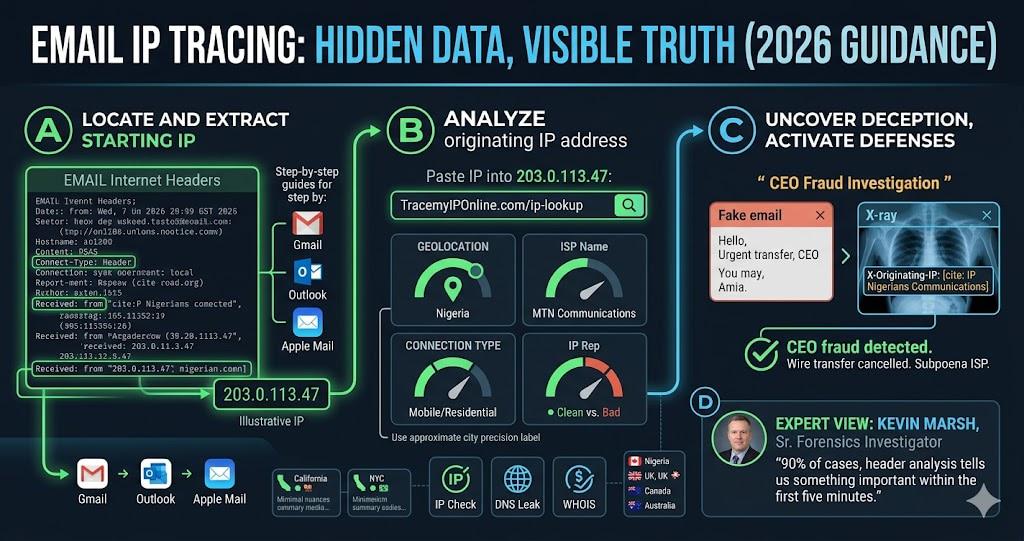
"Email header analysis is the first thing we do when investigating online harassment or business email compromise. The originating IP won't always identify the exact person, but it narrows geography, confirms or contradicts the sender's claimed location, and often reveals whether a VPN or proxy was used — which itself is useful information. In 90% of cases, header analysis tells us something important within the first five minutes."
— Kevin Marsh, Senior Digital Forensics Investigator, CyberTrace Intelligence
What Email Headers Actually Contain
When you receive an email, the visible part — from, to, subject, body — is the surface. Underneath that is the header, a block of technical metadata that records every server the email passed through on its way to you.
Headers are written in reverse chronological order. The bottom entries are the earliest — where the email originated. The top entries are the most recent — the servers closest to you. What you are looking for is the earliest "Received:" line, which contains the IP address of the sending mail server.
A typical email header includes: the sending server IP, each relay server the email passed through with timestamps, authentication results (SPF, DKIM, DMARC pass or fail), message ID, and the X-Originating-IP header in some email clients, which can reveal the sender's actual device IP rather than just the mail server.
How to Find Email Headers — Step by Step for Every Major Email Client
Gmail (Desktop)
Open the email. Click the three-dot menu in the top right corner of the email (not the main Gmail menu — the one specific to that message). Select "Show original." A new tab opens showing the full raw email with all headers. Copy everything above the first blank line for analysis.
Outlook (Desktop)
Open the email. Go to File. Click Properties. The headers appear in the "Internet headers" box at the bottom of the Properties window. Select all text in that box and copy it.
Apple Mail (Mac)
Open the email. Go to View in the menu bar. Select Message. Click All Headers. The full header now appears above the email body.
Yahoo Mail
Open the email. Click the three-dot menu at the top of the email. Select "View raw message." The full headers appear in a new window.
Thunderbird
Open the email. Go to View. Select Headers. Click All. Alternatively, press Ctrl+U to view the full source including headers.
How to Extract the IP Address From an Email Header
Once you have the raw headers, finding the IP is straightforward. Look for lines starting with "Received: from" — there will be several. Find the bottom-most one (the earliest in the email's journey). The IP address appears in square brackets within that line.
It looks like this:
Received: from mail.example.com (mail.example.com [203.0.113.47])
Received: from mail.example.com (mail.example.com [203.0.113.47])
The number in brackets — 203.0.113.47 in this example — is the IP address you want to analyze. Copy it and paste it into tracemyiponline.com/ip-lookup.
Two important caveats. First: if the email came through Gmail's or Outlook's servers, the "Received" entries showing Google or Microsoft IPs are relay servers, not the sender's IP. Look past these for the originating IP. Second: look for an "X-Originating-IP" header, which Gmail and some other providers include — this sometimes shows the actual device IP rather than the mail server IP.
What to Do With the IP Address Once You Have It
Geographic location: Country, state, and city (approximate). If someone claims to be emailing from London but the header IP resolves to Lagos, that is immediately useful information.
ISP name: The internet provider hosting that IP. For harassment cases, the ISP is who you file abuse reports with. For business fraud cases, the ISP can be subpoenaed.
Connection type: Residential (an actual home connection), datacenter (a server or VPN), or mobile carrier. A "residential" classification suggests a real person on their home network. "Datacenter" suggests a VPN, proxy, or server — meaning the IP you found is not the sender's real IP.
IP reputation: Whether the IP is associated with known spam or malware activity. Useful for assessing whether a suspicious email is from an established threat actor or a one-off.
Cross-check the domain in the "From" address using our WHOIS Lookup to verify when it was registered and who controls it.
Before vs After: Email Fraud Investigation in Practice
Scenario — CEO fraud email: A company accountant receives an email appearing to be from the CEO requesting an urgent wire transfer of $85,000. The email address looks right. The tone sounds right.
Header analysis reveals: X-Originating-IP: 41.203.64.109. IP Lookup result: Nigeria. ISP: MTN Nigeria Communications. Connection type: Mobile. The CEO is traveling in Germany that week — confirmed through calendar. The email, despite spoofing the correct from address, originated from a Nigerian mobile network. Wire transfer cancelled. ✅
Without header analysis: Standard email filters passed the message because the domain was spoofed convincingly. The fraud would have succeeded. A 10-second IP lookup on the email header caught it.
For California and New York Users: Email Fraud Laws and What IP Evidence Enables
California's Penal Code 502 covers unauthorized computer access, and email fraud investigations in California frequently use IP header evidence to establish jurisdiction and identify perpetrators. The California Department of Justice's cybercrime unit uses header analysis as a standard investigative technique.
New York's cybercrime statutes similarly treat email fraud as a serious offense, and IP evidence extracted from headers has been used in multiple prosecuted cases. The NYPD Cyber Division specifically advises victims of email fraud to preserve full email headers before contacting police — this is the evidence that makes prosecution possible.
For California and New York users experiencing email harassment or fraud, document everything: full headers, IP lookup results from tracemyiponline.com/ip-lookup, and timestamps. This package is what investigators need to act.
For London and UK Users: Email Harassment and the Malicious Communications Act
Under the UK's Malicious Communications Act 1988 and the Communications Act 2003, sending threatening or grossly offensive emails is a criminal offence. Action Fraud, the UK's reporting service, requires complainants to submit technical evidence including email headers and IP information.
The National Cyber Security Centre's guidance for email fraud victims specifically recommends extracting headers and tracing originating IPs. For London, Manchester, and Birmingham residents, this process is the practical starting point for any email harassment complaint. Run the originating IP through our IP Lookup to document the geographic origin before filing any report.
For Toronto and Ontario Users: CASL Violations and Email Tracing
Canada's Anti-Spam Legislation (CASL) prohibits sending commercial electronic messages without consent. The CRTC investigates CASL violations and relies on technical evidence — including header analysis and originating IP data — to build cases. CASL penalties go up to CAD $10 million for organizations.
Ontario businesses receiving suspicious commercial emails that appear to be CASL violations can extract the originating IP and use our IP Lookup to document the origin. This evidence, combined with the full headers, is what CRTC investigators request when processing complaints through the Spam Reporting Centre.
For Sydney and Australian Users: Scam Email Tracing with the ACCC
Australia's Scamwatch (operated by the ACCC) and the Australian Signals Directorate both accept email scam reports with technical evidence. For Australian residents in Sydney, Melbourne, and Brisbane receiving scam emails, the process is: extract the originating IP from headers, look it up at tracemyiponline.com/ip-lookup, document the result, and include everything in your Scamwatch report.
The ASD's Australian Cyber Security Centre also operates the ReportCyber portal for more serious email fraud and hacking incidents. Header evidence strengthens every report filed with these agencies.
Limitations of Email IP Tracing — What It Cannot Do
Honest assessment: email IP tracing has real limits that are worth understanding before you start.
VPNs and proxies: If the sender used a VPN or proxy, the IP in the header belongs to the VPN provider, not the actual sender. The location will be wherever the VPN server is, which tells you nothing useful about the sender's real location. You can confirm this possibility — if the IP lookup shows a datacenter ASN, a VPN is likely involved.
Webmail and corporate mail servers: Emails sent via Gmail, Outlook.com, or corporate mail servers often show the provider's IP rather than the sender's device IP. The X-Originating-IP header sometimes captures the actual device IP, but not always.
Tor: Emails sent through Tor network routing will show a Tor exit node IP, which is intentionally untraceable back to the sender.
Shared IPs: Many ISPs use CG-NAT, meaning multiple customers share one public IP. Even if you identify an IP, it may belong to hundreds of households.
None of these limitations make IP tracing useless — they mean the information needs to be interpreted carefully rather than taken as definitive. Even knowing an email came from a VPN is useful information.
Frequently Asked Questions
Is tracing an email IP address legal?
Analyzing email headers that you received is completely legal — you own the headers of emails sent to you. Using the information to harass someone would not be, but the analysis itself is standard investigative practice and is encouraged by law enforcement agencies worldwide.
Can I trace an email if the sender used Gmail?
Gmail's servers relay all messages, so the standard "Received" headers show Google's servers rather than the sender's IP. However, check for an "X-Originating-IP" header — in some cases Gmail includes the sender's device IP there. For Gmail-to-Gmail messages, Google deliberately omits this for privacy reasons.
What if the IP lookup shows the wrong country?
IP geolocation is approximate and based on registration data, not GPS. The ISP and general region are typically accurate even when the specific city is off. If an email claims to come from New York and the IP resolves to a specific ISP in Eastern Europe, the location discrepancy is meaningful even without city-level precision.
Can I get the sender's exact home address from the IP?
No. IP geolocation gives approximate location — typically city level. The actual home address requires a subpoena to the ISP, which is only available to law enforcement with a court order. For serious matters (harassment, fraud), file a report and provide the IP evidence to police, who can pursue the ISP legally.
What is the X-Originating-IP header?
This is a non-standard header that some email providers add to reveal the sender's device IP, separate from the mail server IP. Not all email services include it. When present, it is often more useful than the standard "Received" headers because it can show the actual device rather than a relay server.
How do I report an abusive email in the UK?
Report to Action Fraud (actionfraud.police.uk) for fraud, or to your local police for harassment and threats. Include the full email headers and the IP lookup results from tracemyiponline.com/ip-lookup. The NCSC also accepts reports of phishing emails via their phishing reporting service.
How do I report to the ACCC in Australia?
Use Scamwatch (scamwatch.gov.au) for scam emails and ReportCyber (cyber.gov.au/report) for hacking or serious fraud. Attach the full headers and your IP lookup documentation when submitting.
Is there a way to trace anonymous emails?
Anonymous email services (ProtonMail, Tutanota, Guerrilla Mail) are specifically designed to prevent IP tracing — they do not include originating device IPs in headers. However, the email service itself has access logs that law enforcement can subpoena. The header analysis still reveals which anonymous service was used, which is relevant for the investigation.
The Practical Summary
Finding an IP address from an email takes about 2 minutes once you know where to look. What you do with that IP is the more important question.
For most people reading this: the most useful application is fraud verification. Before wiring money, providing credentials, or acting on an urgent request from an email that seems slightly off — check the headers. A five-minute check against tracemyiponline.com/ip-lookup has stopped wire transfers, prevented credential theft, and identified impersonation attacks that were convincing enough to fool experienced professionals.
Also useful: verifying whether a VPN is masking an email's true origin, checking whether a claimed sender location matches what the headers say, and building the technical evidence package for an abuse or fraud report.
Start the IP lookup at tracemyiponline.com/ip-lookup. Cross-reference domains with our WHOIS Lookup. Check DNS authentication records with our DNS Lookup. All free, no signup.