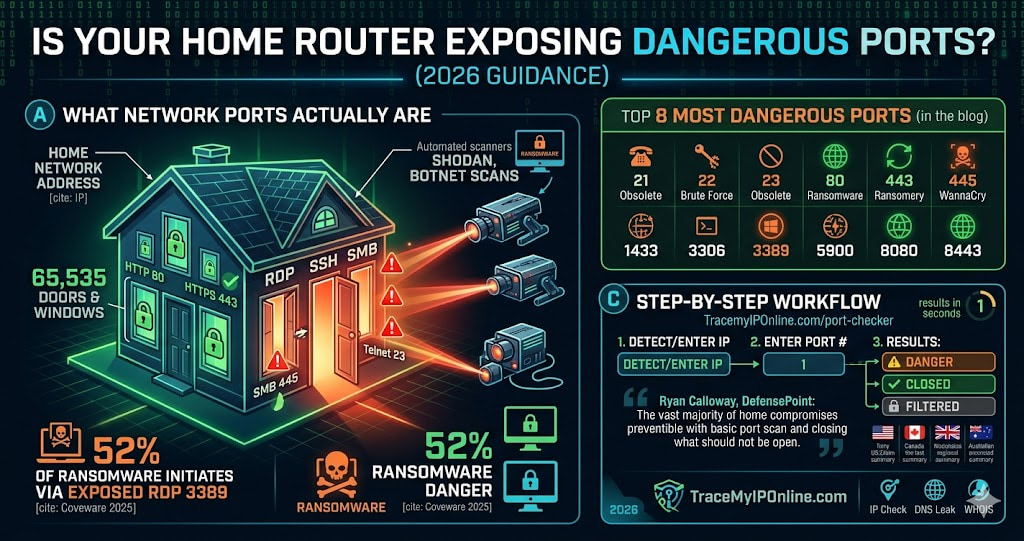
UPnP is enabled by default on most home routers, and it allows any device on your network to open firewall ports without asking permission. Your smart TV or gaming console may have opened ports that are now visible to every scanner on the internet. Shodan indexes new open ports from home networks every day. Here is how to check yours — and close what should not be open.
Your Home Router Has Ports Open That You Never Opened
This is not a hypothetical. UPnP — Universal Plug and Play — is enabled by default on most home routers and allows any device on your network to open ports in your firewall without asking permission. Your smart TV, gaming console, or printer may have opened ports that are now visible to every scanner on the internet. Shodan, the search engine for internet-connected devices, indexes new open ports from ordinary home networks every day.
Check which ports are currently open on your network at tracemyiponline.com/port-checker — free, no download, no signup, results in seconds.
"In incident response work, we almost never see attackers exploit zero-days on home networks. What we see constantly is attackers scanning for common open ports — RDP on 3389, SSH on 22, Telnet on 23 — and brute-forcing or exploiting known vulnerabilities on services that should never have been internet-facing in the first place. The vast majority of home network compromises we investigate would not have happened if the owner had run a basic port scan and closed what should not have been open."
— Ryan Calloway, Principal Incident Responder, DefensePoint Cybersecurity
What Network Ports Actually Are
An IP address is like a building address. Ports are the individual doors and windows in that building. Your device has 65,535 ports. Some are standardized — port 80 is HTTP web traffic, port 443 is HTTPS, port 25 is email — and services that use them are expected to be listening there. Most others should be closed: no service listening, no entry point for attackers.
When a port is "open," something on your network is actively listening for incoming connections on that port. When a port is "closed," connection attempts are rejected. When a port is "filtered," a firewall is intercepting the traffic before it reaches the service.
Attackers scan entire IP ranges for open ports automatically, around the clock. Shodan does this legitimately for research. So do thousands of opportunistic scripts running on compromised servers worldwide. Your open ports are being discovered whether you know about them or not.
The 8 Most Dangerous Ports Commonly Open on Home Networks
Port 3389 — Remote Desktop Protocol (RDP): Designed for remote access to Windows computers. The #1 ransomware entry point globally. Coveware's 2025 ransomware report found exposed RDP was the initial access vector in 52% of all ransomware incidents. If this port is open on your network and you did not intentionally configure it, close it immediately.
Port 22 — SSH (Secure Shell): Remote server administration. Receives automated brute-force login attempts within minutes of being exposed. If you run a home server and need SSH access, restrict it to specific IP addresses rather than leaving it open to all traffic.
Port 23 — Telnet: Completely obsolete. Sends all data — including passwords — unencrypted. Any router or device still running Telnet should have it disabled immediately. No legitimate use case exists for Telnet in 2026.
Port 21 — FTP: Unencrypted file transfer. Credentials sent in plaintext. Superseded by SFTP (which uses port 22) and FTPS. Old NAS devices and network printers sometimes run FTP by default. Check and disable.
Port 445 — SMB (Server Message Block): Used for Windows file sharing. The WannaCry ransomware that infected 200,000+ systems in 2017 exploited exposed Port 445. Systems with this port open continue to be actively attacked in 2026.
Port 8080 — HTTP Alternate: Often used by router admin interfaces, IoT device management, and development servers. If you are not intentionally running a web service on 8080, this should not be open.
Port 1433 — Microsoft SQL Server: Database access port. An open SQL Server port accessible from the internet is an invitation to database theft. Should only be accessible within your private network.
Port 5900 — VNC (Virtual Network Computing): Remote desktop access, often with weaker authentication than RDP. Frequently found open on networks with IoT devices and older computers. Requires strong authentication and should be restricted to VPN access only.
How to Check Your Open Ports — Step by Step
- Go to tracemyiponline.com/port-checker
- Your public IP is auto-detected, or enter any IP manually
- Enter the port number you want to check
- Results show: OPEN (service listening, accessible from internet), CLOSED (no service, or firewall rejecting), or FILTERED (firewall intercepting)
- Check all high-risk ports individually: 21, 22, 23, 80, 443, 445, 1433, 3306, 3389, 5900, 8080, 8443
The test checks your public-facing IP — the one the internet sees. This is what attackers scan. An "open" result means the port is genuinely reachable from the internet, not just from within your local network.
Before vs After: A Home Network Security Audit
Network scan results before remediation:
Port 21 (FTP): OPEN — NAS device running old firmware with FTP enabled by default. Port 23 (Telnet): OPEN — Old router admin interface, never disabled. Port 3389 (RDP): OPEN — Windows PC with Remote Desktop enabled, UPnP forwarded port automatically. Port 8080 (HTTP Alt): OPEN — IP camera management interface, accessible from internet.
What this means: Four separate entry points for attackers. The IP camera alone represents a serious privacy risk — its admin interface being internet-accessible means anyone who finds it and knows the model's default credentials (or has no-auth vulnerability) can view the camera feed.
After 45 minutes of remediation: FTP disabled on NAS, router Telnet disabled, RDP restricted to VPN-only access, IP camera management interface blocked at router. All four ports now show CLOSED on rescan at tracemyiponline.com/port-checker. Attack surface eliminated. ✅
For California and New York Users: Port Security and Data Breach Liability
California's CCPA and the California Consumer Privacy Rights Act create legal exposure for businesses that suffer data breaches due to inadequate security. "Reasonable security measures" is the standard — and in breach litigation, courts and the California AG's office have increasingly looked at whether basic security hygiene, including network port security, was in place.
A 2025 class action in California involved a small business whose customer database was accessed through an exposed SQL Server port (1433). The breach affected 15,000 California residents. Because the port had been open and accessible from the internet without any access control, CCPA liability attached. For California businesses, port security is not just a technical concern — it is a legal one.
New York's SHIELD Act similarly requires businesses to implement reasonable safeguards. An exposed RDP port that enables ransomware entry, with subsequent notification obligations to affected New York residents, is exactly the scenario the SHIELD Act was designed to address. Run a port scan at tracemyiponline.com/port-checker and check your IP reputation at our Blacklist Checker.
For London and UK Businesses: Ports, Cyber Essentials, and NCSC Guidance
The UK government's Cyber Essentials certification — mandatory for suppliers to government contracts and increasingly expected across private sector — requires all unnecessary network ports to be blocked. The NCSC's "10 Steps to Cyber Security" guidance specifically identifies network security configuration, including port management, as a foundational control.
For London businesses pursuing Cyber Essentials or Cyber Essentials Plus certification, a port scan before the assessment identifies issues that will be flagged by assessors. Management ports — RDP (3389), SSH (22), database ports — must be inaccessible from the internet or protected by multi-factor authentication. Our free Port Checker gives immediate visibility into what is currently exposed.
For Toronto and Ontario Organizations: PIPEDA and Network Security
The Office of the Privacy Commissioner of Canada has issued findings in multiple breach cases where inadequate network security — including exposed ports — was identified as a contributing factor to unauthorized access to personal information. PIPEDA's principle of safeguards requires organizations to protect personal information using security appropriate to the sensitivity of the data.
Ontario organizations in finance, healthcare, and legal services face particular scrutiny. A ransomware incident entered through an exposed RDP port constitutes a reportable breach under PIPEDA if personal information was accessed. The CRTC and OPC both receive mandatory breach reports that include technical details about how access was obtained. Document your port security posture with a scan at tracemyiponline.com/port-checker.
For Sydney and Australian Organizations: ACSC Essential Eight and Port Management
The Australian Cyber Security Centre's Essential Eight framework — the baseline for Australian government agencies and adopted voluntarily across private sector — includes patch applications and network access controls as foundational elements. The ACSC's specific guidance on internet-facing services explicitly recommends disabling all unnecessary services and closing unused ports.
Australian organizations in Sydney, Melbourne, and Brisbane saw a 78% increase in ransomware incidents in the three years through 2025 (ACSC Annual Cyber Threat Report). RDP and SMB exposure were the most common entry vectors. Check your organization's exposed ports at tracemyiponline.com/port-checker — free, no software required.
How to Close Dangerous Open Ports
Step 1 — Access your router admin panel: Open a browser and navigate to 192.168.1.1 or 192.168.0.1. The login credentials are usually printed on a label on the router. If not, try the manufacturer's default (often "admin"/"admin" or "admin"/"password").
Step 2 — Disable UPnP: Find UPnP settings (usually under Advanced, Network, or Security). Disable it. This prevents devices from automatically opening ports without your knowledge. Some IoT devices will lose functionality — this is usually acceptable given the security risk UPnP creates.
Step 3 — Review port forwarding rules: Find the Port Forwarding section. Review every rule listed. Delete any you did not create intentionally or no longer need. Document what each remaining rule is for.
Step 4 — Enable SPI firewall: Stateful Packet Inspection filters traffic by tracking connection state. Most modern routers have this option — enable it if present.
Step 5 — Disable remote management: Unless you need to manage your router from outside your home network, disable Remote Management. This closes the router admin interface to external access.
Step 6 — Verify the changes: After completing the above, rescan at tracemyiponline.com/port-checker to confirm the dangerous ports now show CLOSED or FILTERED.
Frequently Asked Questions
Is the Port Checker tool completely free?
Yes — 100% free, no signup, no account, no usage limits. Visit tracemyiponline.com/port-checker and check any port on any IP instantly.
Is scanning ports on my own network legal?
Scanning your own IP address is completely legal. Scanning other people's networks without authorization is illegal under computer crime laws in virtually every country. Our tool is for checking your own network's public-facing exposure.
What does it mean if a port shows as FILTERED?
FILTERED means a firewall is intercepting the scan probe before it reaches the service. The port may or may not have a service behind it — the firewall is blocking visibility. This is generally a good sign, as it means your firewall is functioning.
My port scanner shows port 80 as open — is that dangerous?
Port 80 is standard HTTP web traffic. If you are intentionally hosting a website or web application, it should be open. If you are not running any web server and it is open, something on your network may be running an unexpected web service — investigate what is listening on that port.
My router has UPnP disabled but ports still show as open. Why?
Ports may have been manually forwarded in your router configuration before UPnP was disabled. Check the port forwarding rules in your router admin panel and remove any you did not intentionally create. Also check whether the ports showing open correspond to services you are actually running.
Can attackers access my devices if no ports are open?
Closing unnecessary inbound ports eliminates the most common attack vectors. However, outbound connections you initiate can still be exploited in some scenarios (drive-by downloads, malicious websites). Port security is one layer of defense, not a complete solution. Combine with patching, strong authentication, and DNS-layer filtering.
How often should I run a port scan?
At minimum: when you add new devices to your network, after router firmware updates, and monthly as routine maintenance. Immediately if you suspect compromise or notice unusual network activity.
Why does my port scan show different results from different locations?
Different locations may be hitting different network infrastructure or running into geographic firewall rules. For the most accurate picture of your public exposure, test from multiple external vantage points — or use our tool, which scans from an external server by design.
One Scan Can Change Your Network's Risk Profile Significantly
Most home network security advice is vague. "Keep your router updated." "Use strong passwords." Useful, but abstract.
A port scan is concrete. You run it, you get a list, and you can see exactly what is exposed. The fixes are specific: close this port, disable this service, update this device. The improvement is measurable — before and after numbers. This is unusual in security, where progress is often hard to quantify.
Run your port scan at tracemyiponline.com/port-checker — free, no signup. Check your IP reputation at our Blacklist Checker. Verify your VPN is working at our VPN Detector. All free at TraceMyIPOnline.com.