Frustrated because your go-to Discord IP resolver is suddenly not working? You aren't alone. Discover the recent technical changes to Discord's API, why packet sniffing fails on modern voice channels, and how to safely navigate network diagnostics in 2026.
Discord IP Resolver Not Working? The Technical Truth & Fixes (2026)
Author: TraceMyIPOnline Network Security Team Last Updated: August 2026 Reviewer: Network Administrator & Cybersecurity Analyst Educational Disclaimer: This guide is intended for network administrators, server owners, and cybersecurity students. We do not endorse the use of IP resolvers for harassment, doxxing, or DDoS attacks.
If you have recently tried to use a tool to find a user's IP address on Discord, you have likely run into a frustrating roadblock. Across forums and Reddit, the most common complaint in the community right now is: "Why is the Discord IP resolver not working?"
Author: TraceMyIPOnline Network Security Team Last Updated: August 2026 Reviewer: Network Administrator & Cybersecurity Analyst Educational Disclaimer: This guide is intended for network administrators, server owners, and cybersecurity students. We do not endorse the use of IP resolvers for harassment, doxxing, or DDoS attacks.
If you have recently tried to use a tool to find a user's IP address on Discord, you have likely run into a frustrating roadblock. Across forums and Reddit, the most common complaint in the community right now is: "Why is the Discord IP resolver not working?"
Whether you are a server admin trying to block a persistent troll who keeps evading bans, or just a tech enthusiast testing network security, understanding why these tools fail is crucial.
In 2026, the landscape of voice-over-IP (VoIP) security has drastically shifted. This comprehensive guide breaks down exactly why your old Discord IP resolvers are broken, the technical reality of Discord's modern server architecture, and what it means for network diagnostics.
1. Why is the Discord IP Resolver Not Working? (The Short Answer)
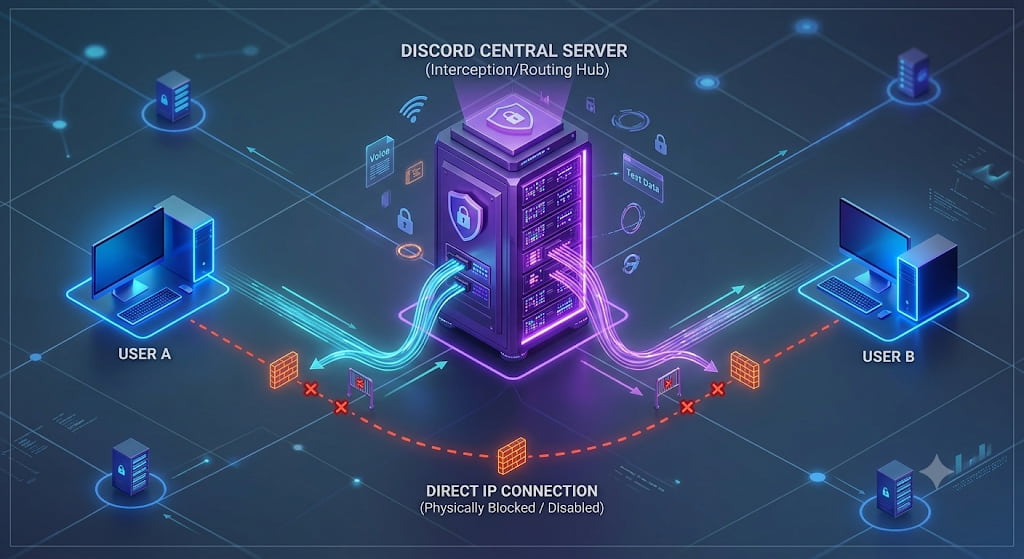
The primary reason your Discord IP resolver is failing is that Discord no longer uses Peer-to-Peer (P2P) connections for its voice or text channels.
In the early days of VoIP gaming (like old Skype or early Xbox Live), voice data was sent directly from Player A's router to Player B's router. IP resolvers exploited this direct connection. Today, Discord acts as an impenetrable middleman.
2. The Technical Shift: How Discord Handles Data in 2026
To understand why tools break, you need to understand how Discord routes its traffic today.
The Client-Server Architecture When you join a Discord voice channel or send a direct message, your computer does not connect to the other person. Instead:
- Your device connects via an encrypted WebSocket to one of Discord's central servers (e.g., a server hosted in US-East or Europe).
- The other user also connects to that exact same central server.
- The server processes the audio/text and distributes it to everyone in the channel.
What does a packet sniffer see? If you run a network analyzer (like Wireshark) while in a Discord call, you will not see the IP addresses of the other people in the call. You will only see the IP address of the Discord server you are connected to. Because the resolver cannot intercept the endpoint data, it fails completely.
3. API Changes and Database Wipes
Many web-based Discord IP Resolvers (the "one-click" websites) relied on massive databases. They scraped data from insecure third-party websites where users logged in with their Discord accounts.
However, recent changes have broken these tools:
- Stricter API Rate Limits: Discord has locked down its developer API, making it incredibly difficult for malicious bots to scrape user IDs and associate them with external IPs.
- Dynamic IPs: Even if a database has an IP address linked to a Discord ID from 2024, ISPs in Tier-1 countries frequently rotate IP addresses. By 2026, that saved IP is likely assigned to a completely different household, making the resolver's result useless.
4. The Myth of the "Working" 2026 Discord Resolver
If you search Google or YouTube, you will find dozens of videos claiming to have a "New Working Discord IP Resolver for 2026."
Warning: 99.9% of these are malicious. Because it is technically impossible to pull an IP directly through Discord's current servers, these fake tools rely on social engineering. They operate in two ways:
- IP Loggers: The tool requires you to send a disguised link to the target via Discord. The tool only works if the target clicks the link outside of the Discord app, revealing their IP to the web browser. (This is link-tracking, not Discord resolving).
- Malware Traps: The "tool" you download is actually a trojan designed to steal your Discord authentication token, hijacking your own account.
5. Legitimate Alternatives for Server Admins
If you are a Discord server owner dealing with ban evaders (users who create new accounts to bypass bans), you don't need an IP resolver. You need better server-side security.
- Enable Highest Verification Levels: Force users to have a verified phone number attached to their Discord account before they can send messages in your server. This stops 95% of ban evaders.
- Use Anti-Raid Bots: Bots like Wick or Beemo use behavioral analysis and global ban databases to automatically kick known malicious accounts before they even speak, rendering IP tracking unnecessary.
- Report to Discord Trust & Safety: If someone is issuing real-world threats, Discord holds the IP logs. Report the Message ID directly to Discord; they have the legal authority to act on server-side IP data.
6. Frequently Asked Questions (FAQ)
Q: Can Discord staff see my IP address? A: Yes. For security, anti-spam, and legal compliance, Discord logs the IP address used to create an account and the IPs used during logins. However, this information is strictly confidential and never shared with other users.
Q: Does using a VPN stop a Discord IP logger link? A: Yes. If a user tries to trick you into clicking an external IP-logging link, having a premium VPN active means the logger will only capture the VPN server's location, keeping your true home network safe.
Q: Are there any Discord voice channels that are still P2P? A: No. As of recent updates, all direct voice calls (DMs) and server voice channels are routed entirely through Discord's central servers.
Conclusion
The era of simple Discord IP resolvers is over, thanks to robust Client-Server architecture and strict API limitations. If your resolver isn't working, it means Discord's security is doing its job. Instead of searching for broken or malicious tools, server administrators should focus on Discord's built-in verification features, and everyday users should continue to practice good link hygiene to protect their digital footprint.