Every time someone explains port security, the advice is "close all open ports." This is technically impossible — ports are how your computer communicates with everything on the internet. The relevant question is which ports are open, what services are listening on them, and whether those services should be accessible from the internet.
Open Ports Are Not All Dangerous — Understanding Which Ones Actually Are
Every time someone explains port security, the advice is "close all open ports." This is technically impossible — ports are how your computer communicates with everything on the internet. The relevant question is which ports are open, what services are listening on them, and whether those services should be accessible from the internet.
Check which ports are currently open on your network at tracemyiponline.com/port-checker — free, no signup.
"The common advice to close all open ports is technically confused. The relevant attack surface is inbound listening ports — services waiting for incoming connections from the internet. Most users have very few of these by design, but port forwarding rules, UPnP, and misconfigured software can create unexpected ones without any visible notification to the user."
— Dr. Hari Subramanian, Network Security Architecture, IIT Madras
Inbound vs Outbound Ports — The Key Distinction
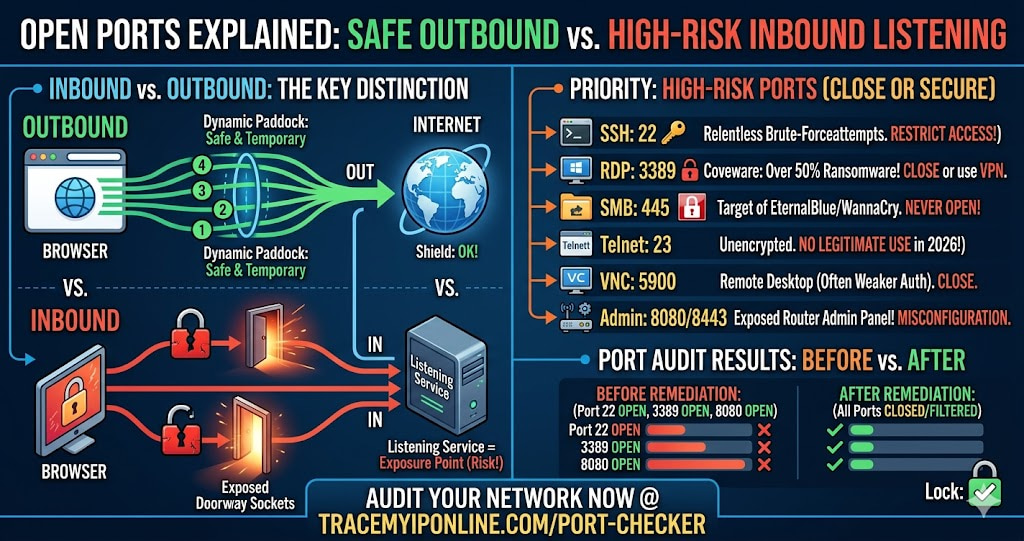
Outbound ports: When your browser loads a website, your OS assigns a temporary ephemeral port — typically above 49152 — for that connection. These are dynamically assigned, exist only for the duration of the connection, and are not open in the sense that matters for security.
Inbound listening ports: These are the ports that matter. A service running on your machine that waits for incoming connections — a web server, SSH server, remote desktop service, or game server — opens a port and listens for connections from anywhere. If this port is accessible from the internet through your router, any machine on the internet can attempt to connect to it.
A port scan at tracemyiponline.com/port-checker checks your public IP for inbound listening ports — the ones accessible from the internet. This is the relevant security check.
The High-Risk Ports Worth Knowing
Port 22 (SSH): Secure Shell — remote command-line access. If open externally on a home network, it receives relentless automated brute-force attempts within minutes of being exposed. If you need SSH access, restrict it to specific IP addresses or use key-based authentication with fail2ban.
Port 23 (Telnet): Unencrypted remote access — transmits everything including passwords in plaintext. Has no legitimate use in 2026. If this port is open on your network, disable the service immediately.
Port 3389 (RDP — Remote Desktop Protocol): Windows Remote Desktop. Coveware's 2025 ransomware report attributed over 50% of ransomware infections to exposed RDP. If this port is open externally, close it. If you need remote Windows access, use a VPN to reach your home network first, then RDP internally.
Port 445 (SMB): Windows file sharing. The EternalBlue exploit used by WannaCry targets this port. Should never be open to the internet.
Port 5900 (VNC): Remote desktop access, often with weaker authentication than RDP. If open externally, close it immediately.
Port 8080 and 8443: Often used for router admin interfaces or IoT device management. A router admin interface exposed to the internet is a serious misconfiguration.
Before vs After: Port Audit Results
Home network, three-year-old port forwarding rules — scan at tracemyiponline.com/port-checker: Port 22 OPEN (NAS device, original admin password unchanged), Port 3389 OPEN (Windows Remote Desktop from pandemic home office setup, never disabled), Port 8080 OPEN (router admin panel accidentally exposed), Port 25565 OPEN (Minecraft server from 2023, no longer running).
After remediation: NAS SSH — password changed, key-based auth enabled, access restricted to local network only. RDP — rule deleted, VPN configured for remote access. Router admin — remote management disabled. Minecraft — rule deleted. Rescan: all four ports now CLOSED or FILTERED. ✅
For California and New York Users
California's IoT security law (SB-327) requires unique default passwords for connected devices, addressing one common exposed-port vulnerability. New York's SHIELD Act creates obligations for businesses handling New York residents' data — home office workers with client data have an implied network security responsibility. Run the port audit at tracemyiponline.com/port-checker and close or secure anything not actively needed.
For London and UK Users
The UK's PSTI Act 2022 sets security requirements for consumer IoT devices, including prohibiting universal default passwords. The NCSC's Cyber Aware campaign specifically mentions closing unnecessary ports as one of six key security behaviors. Check your port exposure at tracemyiponline.com/port-checker.
For Toronto and Ontario Users
Ontario home office workers under PIPEDA obligations should maintain minimal network exposure. Port 3389 and Port 22 exposed to the internet represent unnecessary risk for any network handling personal or client data. Run the port audit at tracemyiponline.com/port-checker and close anything not justified by current business need.
For Sydney and Australian Users
The ACSC's Essential Eight includes "restrict administrative privileges" — implying administrative interfaces should not be internet-accessible. An exposed router admin panel, Windows RDP, or SSH directly facing the internet violates this intent. Audit with tracemyiponline.com/port-checker.
Frequently Asked Questions
Is the Port Checker tool free?
Yes — 100% free, no signup. Visit tracemyiponline.com/port-checker and check any IP's open ports instantly.
My port scan shows FILTERED instead of OPEN — is that safe?
FILTERED means a firewall is blocking scan probes before they reach any service. Generally better than OPEN — it means your firewall is dropping unsolicited connection attempts. Not a concerning result for ports you did not intentionally expose.
How do I close a port that shows OPEN?
Find what is creating the open port: check your router's port forwarding rules for that port number, check UPnP settings (UPnP may have automatically opened it), and check whether software on your devices is listening on that port. Delete the rule or disable the service. Rescan at tracemyiponline.com/port-checker to confirm it is closed.
Some ports show open that I did not configure — where did they come from?
Most commonly from UPnP (devices opening ports automatically) or software that creates listening services. Check UPnP status in your router admin and consider disabling it. Check your IP reputation at tracemyiponline.com/blacklist-checker — unexpected open ports combined with blacklisting suggests a compromised device.
Is it ever safe to have port 3389 open to the internet?
The recommendation is no — not because it is technically impossible to secure, but because the history of critical RDP vulnerabilities and active exploitation makes direct exposure high-risk regardless of password strength. Use a VPN for remote Windows access rather than exposing RDP directly.
What is the difference between a port scan and a vulnerability scan?
A port scan checks which ports are open and accepting connections. A vulnerability scan goes further — it checks whether the services on those ports have known vulnerabilities. Our tool at tracemyiponline.com/port-checker performs port scanning. Vulnerability scanning requires dedicated tools like Nmap or commercial scanners.
The One Question Worth Asking About Every Open Port
For each port that shows OPEN in a scan: do you know what service is listening on it, and does that service need to be accessible from the entire internet rather than just your local network? If the answer to either part is no, the port warrants investigation and likely closure.
Run your port scan at tracemyiponline.com/port-checker. Check IP reputation at tracemyiponline.com/blacklist-checker. See full network profile at tracemyiponline.com/ip-lookup. All free at TraceMyIPOnline.com.